- Home
- Applications
- Bank branches and ATMs
Application
Bank branch and ATM links over fiber
A branch is a tenant of its own building: a teller LAN, an ATM lobby, a camera recorder and one uplink to the regional hub, all in a 19-inch cabinet that somebody else’s contractor built.
7 catalogue models · 5 families
01
What the link has to solve
The branch side is small and mixed. Teller positions and printers sit on copper; the ATM or self-service kiosk may be in a separate lobby or on an external wall; cameras need PoE; and all of it leaves the building over one or two strands to the hub. The self-service segment has a different owner and different rules from the staff segment, so the two cannot simply be plugged into the same flat switch.
Two topologies cover most branches. If the fibre terminates in the cabinet and the router above does the separation, a media converter per service is enough. If the branch needs switching locally, a managed switch with SFP uplinks gives one device for the whole cabinet and one place to look when something is down.
02
Sizing: ports, distance, power, temperature
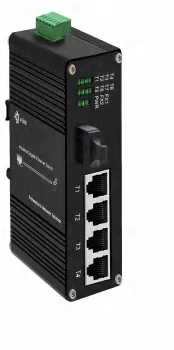
Ports. An 8-port managed switch with two SFP uplinks (ETH-IMC208M) covers a small branch; 16 copper ports with four SFP slots (ETH-DIMC2416M) covers a teller row plus back office plus a camera switch. For the lobby camera, a four-port PoE switch with a fibre uplink (LNK-IMC104GP) keeps power and data on the same link, which is usually the cheapest way to add one camera without touching the branch switch.
Distance. Metro fibre is normally single-mode, and 20 km covers most branch-to-hub distances in the catalogue’s fixed-optics numbers. Beyond that, the SFP models take the reach of the module fitted — a part number, not a different converter.
Power. Branch cabinets have AC, so the AC-input carrier switches (LNK-216M-R with 16 copper ports and two SFP, LNK-424 with 24 copper and four SFP) go straight onto the UPS feed. Where a PoE switch is added, the DC side needs its own supply: the catalogue pairs the 8-port PoE managed models with NDR-240-48 (240 W / 48 V).
Segmentation and temperature are the two questions the printed page answers only partly. The catalogue lists the managed models as L2+ managed and stops there — do not infer a feature list; the datasheet for the exact model comes with the quotation. Temperature reads 0~70 °C where a range is printed, which is fine for a comms room and not obviously fine for an external ATM enclosure.
03
Where it goes wrong
Branch networks are audited, so the failures that matter are usually design failures rather than dead ports.
- 01 One unmanaged switch for everything. The camera vendor and the teller LAN end up in one broadcast domain, and the finding lands on the network team.
- 02 A single uplink with no second path. The catalogue has the parts, but redundancy is a design decision, not a model number.
- 03 PoE budget booked from port count instead of the supply. Four ports at 30 W is 120 W of supply, not 60 W.
- 04 A converter where the kiosk needs its own segment. A converter passes everything it receives, in both directions.
- 05 An external enclosure chosen without asking the operating range. The indoor rating is the one printed; the outdoor answer is confirmed with the quotation.
Recommended models
What we would quote for this link
| Model | Ports | Input power | Transmission distance | Page |
|---|---|---|---|---|
| 8x 10/100/1000T + 2x 1000X SFP | 12~48VDC | depends on the SFP module | p21 | |
| 16x10/100/1000T + 4x1000X SFP | 12~48VDC | depends on the SFP module | p22 | |
| 16 x 10/100/1000T + 2 x 100/1000X SFP | AC 100~240V | depends on the SFP module | p22 | |
| 24 x RJ45+4x SFP | AC 100-240V | depends on the SFP module | p36 | |
| 4x PoE + 1x1000Base-FX (SFP, SC, FC, ST ) | 48~57VDC | 550M or 20KM | p18 | |
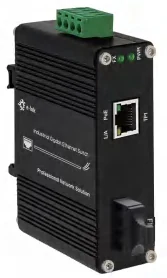
| 1x RJ45+1 x SC/ST/FC 1000Base-X | 12~48VDC | 550M or 20KM | p11 | |
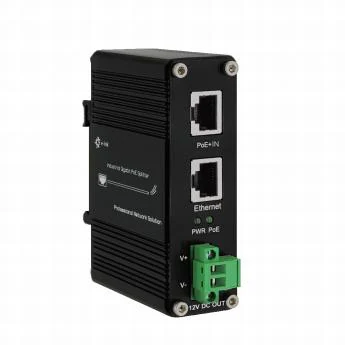
| 2 x RJ45 + 1 x DC | 5V/9V/12V/19V DC 25W 3.5A Max | 100M | p29 |
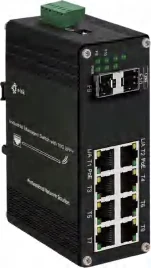
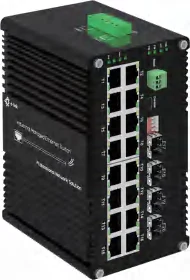
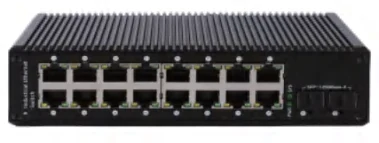
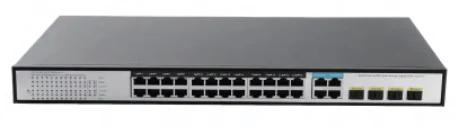
AC-input models are listed for cabinets on UPS; the DC units are for cabinets where the supply is already 12~48 V. Model pages carry the full catalogue table.
Price, minimum order quantity and lead time are not published for any model — they are confirmed with the quotation. Specifications are transcribed from our factory's catalogue; where a field is not printed there it is left out rather than guessed.
Send the drawing, get the model numbers back
Mark the cameras, cabinets, spans and the power available at each site. We answer with the models, the optics for each span, and the supply each cabinet needs — with the quotation.